Features

Ten apps' worth.
One Yoodoo.

Your planner, to-do list, focus timer, app blocker, habit tracker, calendar and AI, all built for how ADHD brains actually work. Here's every bit of it.

Fix my day

Day falling apart?
One tap. Back on track.

This is the bit that makes Yoodoo different. Something ran over, you didn't start, the morning vanished. Yoodoo notices, asks one simple question, and fits the rest of your day around what really happened. No red, no guilt, no starting again.

  • Notices when something runs over or doesn't start, and asks which it is
  • Moves things by priority, and keeps the one that matters most
  • Meetings and locked things never move
  • What doesn't fit goes to Anytime or tomorrow, never into a pile
Today
  • πŸ“§ Clear the inbox11:00 Β· ran over
  • πŸ₯ͺ Lunch12:00
  • πŸ“ž Call the GP12:30
  • 🦷 Dentist14:00never moves
  • πŸ‹οΈ Gym18:00locked
Ran over Β· 25 minClear the inbox was due to finish at 12:00. Tap one
The Timeline

See your day. Actually see it.

Time blindness is real. So on Yoodoo an hour looks like an hour, every task is drawn to its length, and every free gap is right there for you to fill. No more guessing how much you can fit in before 3pm.

  • Tap any free gap to drop something in, or hold a task and drag it where it fits
  • Whatever you're meant to be doing right now is the blue one
  • Lock the things that can't move, like the school run
  • Day view in Lite, any day. Week and Month in Pro
Yoodoo AI

Just say it. Yoodoo AI does the rest.

Tap the sparkle to open Ask Yoodoo and talk, like you'd tell a friend. "Gym at 6, call mum, then laundry." Yoodoo builds the day around what's already there. Change your mind? Just say that too.

  • Plans your day, or changes it, in seconds
  • Files things into the right list
  • Breaks big scary tasks into tiny first steps
  • Starts and ticks your habits, saves and loads day templates
App blocker

Lock out the scroll.

You picked up your phone at 7. It's now 8:10. We've all been there. The blocker locks the apps that eat your day, on a schedule or the moment you need it. On iPhone and Android.

  • Schedules, so mornings are protected without thinking about it
  • Block now, for as long as you choose
  • Turns on with a task's focus
  • A few timed unblocks a day for the real stuff, plus strict mode
  • iPhone uses Apple's Screen Time. Android uses Usage access and a block screen
Focus mode

One task. One timer. Go.

Starting is the hardest bit. Hit Start focus and it's just you and the one thing, with a ring that fills as you go and music to get you in the zone.

  • Pick how long, the whole task or just a few minutes
  • Steps to tick off as you go
  • Keeps time properly even when you leave the app
  • A nudge when time's up, and what's next
Habits

Habits that forgive you.

Most habit apps break your streak the first time life happens. Yoodoo doesn't. Aim for a few times a week, take a rest day, pause it when you're ill. The run keeps going.

  • Routines, repeat tasks and things you're trying not to do
  • One bad day never wipes your progress
  • Big moments at 7, 21, 30, 66 and 100 days
  • Right there on your homepage, one tap to tick
Calendar sync

Your calendar, both ways.

Meetings come in, so you plan around what's really happening. Your tasks go out, so your calendar finally shows the whole day, not just the meetings.

  • Google Calendar and the calendars on your phone
  • Meetings never get moved by Yoodoo
  • Tasks sent back to your calendar
  • Every calendar you use, in one place
Lists

Get it all out of your head.

Forty things in your head and none of them with a day? Type, Enter, next. Dump it all, star what matters, then swipe it onto today when you're ready.

  • As fast as you can type
  • One star for the thing that matters most
  • Swipe right and it's on today
  • Sections with your own colours
Widgets and Live Activities

What's next, without opening anything.

Out of sight is out of mind. So your day lives on your Home Screen and Lock Screen, with what you're doing now and how long is left.

  • On iPhone: Today, Now and next, and the Lock Screen, plus a Live Activity while you focus
  • On Android: Today, Now and next, and Focus, plus a live focus notification
  • Siri on iPhone: add a task, hear what's next, or start your next task
  • Hold the app icon for Ask Yoodoo, New task or Start focus
Stats

See how far you've come.

Your streak, what got done, your time in focus and where your time went. Plus what Yoodoo noticed about you, like when you focus best. Proof you're doing better than your brain tells you.

  • Your streak, and every day you Yoodoo'd
  • Done and planned, by week, month, year and all time
  • Where your time went, and how your days felt
  • What Yoodoo noticed, like your best day of the week
  • Your week on one card, to share
Every device

Plan at your desk. Do it on your phone.

Yoodoo is on iPhone and Android, and in any browser on your Mac or PC, all in sync. Plan the week on the big screen, then let your phone keep you on track.

  • iPhone, iPad and Android
  • The web, in any browser on Mac or PC. Nothing to install
  • Synced and backed up
  • Lists and Timeline side by side on a big screen
  • Your phone works offline, then catches up
Yoodoo in Claude and ChatGPT

Plan in your AI. It lands in Yoodoo.

Connect Yoodoo to Claude, ChatGPT or another AI app. Tell it what's going on and the plan lands on your timeline, on your phone, a few seconds later.

  • Reads your day and your lists
  • Adds tasks, plans the day, moves things and ticks them off
  • Shows you the plan first, and only changes it when you say yes
  • Undoes its last change if you ask
  • Sees when you're busy, never what your events are
  • Works with Claude, ChatGPT and other AI apps that take custom connectors (MCP)
iPhone Duo and foldables

Unfold to plan. Fold to do.

On iPhone Duo, Yoodoo uses both halves. Open it flat and your homepage or Lists sit beside your day. Fold it shut and the outer screen shows what's next.
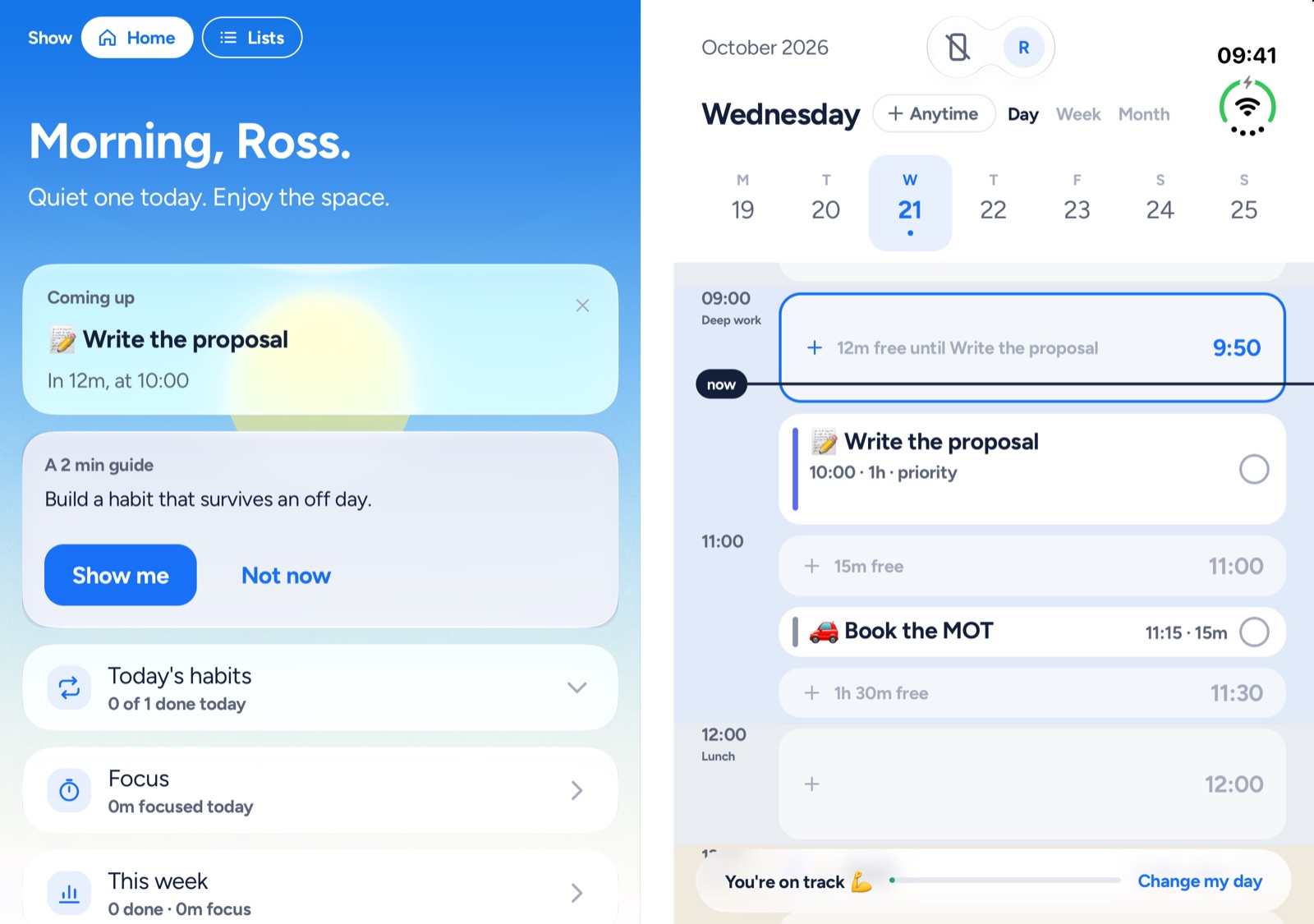
  • Open flat: your homepage or Lists on the left, your day on the right
  • Drag a card across the fold onto the day
  • Folded: the outer screen shows what's next, with Start
  • Fix my day shows the day as it drifted beside the fixed one
  • Focus on one side, your day on the other
  • Android foldables get the open-flat layout
Yoodoo open flat on iPhone Duo: the homepage on the left with what's coming up, the day's timeline on the right
And the little things

The bits that make it stick.

Wrap up

Three taps at the end of the day. What's done, what moves, what stays out of tomorrow.

Reschedule the rest

One tap, no AI. What slipped moves into today's free time, the rest to tomorrow. Undo is right there.

Remind me

A nudge before any task, at the lead time you like. Ring like an alarm for the ones you can't miss (Pro, iPhone).

Repeats

Daily, on the days you pick, every few weeks, or monthly, like the last Friday.

Day templates

Save a good day. Set it to repeat and it lays itself out on the days it's due.

Midday check-in

One question when the afternoon's slipping, with easy ways out.

A goal for the week

A ring on your homepage, then the week told back as a story.

Steps

Break anything down and drag to reorder. Focus shows one step at a time. Create with AI in Pro.

Photos on a task

Up to ten, kept on your phone. The receipt, the parking spot, the plan.

Siri and quick actions

On iPhone, add a task, ask what's next or start your next task, hands free. Hold the app icon for Ask Yoodoo, New task or Start focus.

Ready when you are.

Lite is free for good. Set up your first day in a couple of minutes.

Missing something? Suggest a feature β†’

Download YoodooPro free for 7 days